

Nostalgia Shader
Shader · by RRe36 · 4.6M downloads · Minecraft 1.21.4
What is Nostalgia Shader?
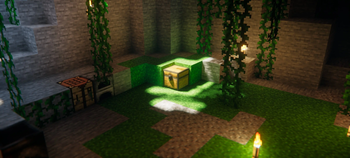
If you remember the early days of shaders – warm, slightly dreamy lighting and that unmistakable "shaders mod" feel – Nostalgia is built to bring it back. Its author, RRe36, set out to recreate the look of those older packs, but on a modern engine with much better performance and features that did not exist back then. The result also happens to resemble the cancelled "Super Duper Graphics Pack" that Mojang once showed.
It sits in a sweet spot: stylised and vanilla-friendly rather than photorealistic.
Features
- Dynamic soft shadows.
- Vanilla-style volumetric clouds in several layers, shaped by your resource pack's cloud texture.
- Screen-space reflections, with optional off-screen environment reflections through reflection capture.
- Volumetric fog for atmosphere in valleys and caves.
- Temporal anti-aliasing for clean edges.
- Optional screen-space path tracing for more accurate bounce light.
- labPBR resource pack support and lens effects such as depth of field, flares and vignette.
Requirements
| What | Needed |
|---|---|
| Loader | OptiFine (1.16+) or Iris 1.5.0+ |
| GPU | OpenGL 4.3 or newer |
| OS | Windows or Linux |
| Minecraft | 1.16 – 1.21.4 on this page |
It is a medium-weight pack. Path tracing and reflection capture are the expensive extras, so leave them off on mid-range hardware and enable them only if you have headroom.
Who it is for and what to pair it with
Nostalgia suits builders and survival players who like vanilla's blocky charm and want gentle, characterful lighting. Use it with Sodium and Iris on Fabric for the best base performance.
If you like this direction, Super Duper Vanilla and Vanilla Plus Shader chase a similar vanilla-plus look.
FAQ
What GPU do I need for Nostalgia Shader?
A graphics card that supports OpenGL 4.3 or newer, on Windows or Linux. macOS is not listed as supported.
Does Nostalgia Shader work with Iris?
Yes, with Iris 1.5.0 or newer. OptiFine for Minecraft 1.16 or later also works.
Why do the clouds look different with my resource pack?
Nostalgia's layered volumetric clouds take their shape from the cloud texture in your resource pack, so changing that texture changes the sky.
Gallery


Downloads by version
🛡 Files are downloaded directly from Modrinth’s servers – we never modify or rehost them. Modrinth ↗
How to install this mod
- Install Iris (with Sodium) or OptiFine – Iris runs on Fabric/NeoForge.
- Click “Download” to get the .zip – do not unzip it.
- Copy it into
.minecraft/shaderpacks. - In game: Options → Video Settings → Shader Packs → select the shader.
💬 Comments
✨ You might also like

Complementary Shaders - Reimagined
by EminGT
Preserving the elements of Minecraft with exceptional quality, detail, and performance.

Bloop Shaders
by espen96
A shader aimed at maximum speed while maintaining good visuals. Scalable from low to high end computers.

Complementary Shaders - Unbound
by EminGT
Transforming the visuals of Minecraft with exceptional quality, detail, and performance.

Solas Shader
by Septonious
A modern fantasy stylized shaderpack with colored lighting and stunning visuals

Bliss Shaders
by Xonk
A well performing fantasy styled shaderpack with emphasis on scene variation and customization.

Rethinking Voxels
by gri573
[WIP] A gameplay shaderpack based on complementary reimagined that has coloured block light with sharp shadows