

BSL Shaders
Shader · by CaptTatsu · 32.3M downloads · Minecraft 26.3
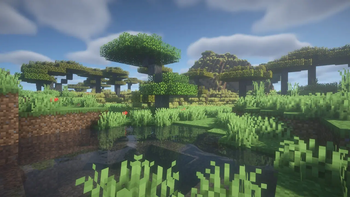
What does BSL look like?
BSL is one of the longest-running shaderpacks for Java Edition, and its style is easy to recognise: bright, saturated and clean. Instead of pushing for gritty realism, it makes the vanilla world look like a polished version of itself – warm sunlight, soft bloom around light sources, sharp sun shadows and glossy water.
Out of the box you get:
- Real-time shadows from the sun and moon.
- Volumetric light – visible light shafts through trees and windows.
- Ambient occlusion and bloom for depth and glow.
- Configurable clouds and water, plus built-in anti-aliasing.
Extras you can switch on include depth of field, motion blur, specular and normal mapping (for PBR resource packs), a cel-shading outline for a cartoon look, and world curvature.
Installing BSL
- Install a shader loader – Iris (recommended on Fabric/NeoForge, ideally with Sodium) or OptiFine.
- Download the BSL zip and drop it, still zipped, into
.minecraft/shaderpacks. - In game, open Options → Video Settings → Shader Packs and select BSL.
The pack lists support from very old releases (1.7.10) through current versions, so it is a safe pick whatever version you play.
Performance tips
BSL is not the heaviest pack around, but shadows and volumetrics cost frames. If your FPS drops:
- Lower shadow resolution and shadow distance first.
- Turn off volumetric light and motion blur.
- Reduce render distance – shaders scale badly with many chunks.
Alternatives worth comparing
- Complementary Reimagined – started from BSL's code and is now its own project with a slightly more modern look.
- BSL Shaders Classic – an older-style variant for those who prefer the earlier BSL feel.
- Insanity Shader – a horror-themed pack built on top of BSL.
Browse all shaders to compare more styles.
FAQ
Does BSL Shaders work with Iris?
Yes. BSL supports both Iris and OptiFine. On Fabric or NeoForge, Iris together with Sodium is the usual choice.
Is BSL good for low-end PCs?
It can run on modest hardware if you choose a lower profile and turn off heavy options such as shadows quality or volumetric light, but very weak integrated GPUs are better off with a lighter pack.
Can I use BSL in YouTube videos?
Yes. The author allows screenshots and videos. What is not allowed is re-uploading the shaderpack files elsewhere without permission.
Gallery


Downloads by version
🛡 Files are downloaded directly from Modrinth’s servers – we never modify or rehost them. Modrinth ↗
How to install this mod
- Install Iris (with Sodium) or OptiFine – Iris runs on Fabric/NeoForge.
- Click “Download” to get the .zip – do not unzip it.
- Copy it into
.minecraft/shaderpacks. - In game: Options → Video Settings → Shader Packs → select the shader.
💬 Comments
✨ You might also like

Complementary Shaders - Reimagined
by EminGT
Preserving the elements of Minecraft with exceptional quality, detail, and performance.

Complementary Shaders - Unbound
by EminGT
Transforming the visuals of Minecraft with exceptional quality, detail, and performance.

Solas Shader
by Septonious
A modern fantasy stylized shaderpack with colored lighting and stunning visuals

PixelCraft Shaders
by SpacEagle17
PixelCraft Shaders is a Complementary Shaders edit aiming to replicate pixel art. Every screenshot is a new piece of art brought to life!

Photon Shaders
by sixthsurge
A gameplay-focused shader pack with a semi-realistic style

Bliss Shaders
by Xonk
A well performing fantasy styled shaderpack with emphasis on scene variation and customization.