

Complementary Shaders - Unbound
Shader · by EminGT · 48.2M downloads · Minecraft 26.3
What is Complementary Unbound?
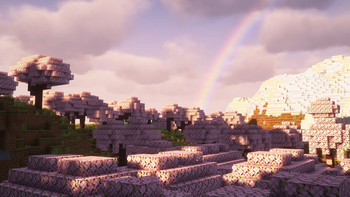
Complementary is one of the most downloaded shader packs for Java Edition, and it comes in two flavours. Unbound is the one aimed at a more realistic image – smoother clouds, richer water and lighting that leans away from the classic blocky look. Its sibling, Complementary Reimagined, uses the same code but starts with settings that stay closer to vanilla's style.
The pack began in 2018 as an edit of BSL Shaders and has since been rewritten and expanded based largely on community feedback, with regular updates still coming.
Highlights
- Effects tuned for nearly every block rather than a one-size-fits-all lighting pass.
- Profiles from Potato to Ultra, so one download covers weak laptops and high-end desktops.
- Built not to get in the way – the author's stated goal is good visuals that never hurt readability in caves, combat or the Nether.
- Full customisation in Shader Options, including switching to blocky clouds or other Reimagined-style choices if you like.
- Tagged features include coloured lighting, PBR support, reflections, bloom and dynamic shadows.
How to install
- Install Iris (with Sodium) – or use OptiFine if you prefer.
- Launch the game, go to Video Settings › Shader Packs and open the shaderpacks folder.
- Drop the downloaded zip in as-is (do not unzip), then pick Complementary Unbound in the list.
The Complementary team also offers an installer that handles these steps for you. The pack covers Minecraft 1.7.2 through 26.3 and runs only on your own client – servers are not involved.
Is Unbound right for you?
Pick Unbound if you want screenshots and survival worlds that look closer to a modern game while staying playable. If you would rather keep Minecraft feeling like Minecraft, try Reimagined. For a moodier, more fantasy-coloured look, compare it with Bliss or Photon. Adding Fresh Animations for mobs makes a big difference in screenshots too.
FAQ
What is the difference between Complementary Unbound and Reimagined?
They are the same shader with different default settings. Unbound starts with a more realistic look, Reimagined keeps Minecraft's blocky charm. Either can be changed to match the other in Shader Options.
Can Complementary Unbound run on a low-end PC?
It ships with profiles from Potato up to Ultra, so you can scale it down a long way. Integrated graphics should start on Potato or Low and raise settings from there.
Does Complementary Unbound work with OptiFine?
Yes, it loads on both Iris and OptiFine. The author recommends Iris, which is the more common choice today and pairs with Sodium.
Gallery


Downloads by version
🛡 Files are downloaded directly from Modrinth’s servers – we never modify or rehost them. Modrinth ↗
How to install this mod
- Install Iris (with Sodium) or OptiFine – Iris runs on Fabric/NeoForge.
- Click “Download” to get the .zip – do not unzip it.
- Copy it into
.minecraft/shaderpacks. - In game: Options → Video Settings → Shader Packs → select the shader.
💬 Comments
✨ You might also like

Complementary Shaders - Reimagined
by EminGT
Preserving the elements of Minecraft with exceptional quality, detail, and performance.

Solas Shader
by Septonious
A modern fantasy stylized shaderpack with colored lighting and stunning visuals

Bloop Shaders
by espen96
A shader aimed at maximum speed while maintaining good visuals. Scalable from low to high end computers.

Bliss Shaders
by Xonk
A well performing fantasy styled shaderpack with emphasis on scene variation and customization.

RedHat Shaders
by mlgimposter
A shaderpack based on older versions of Chocapic13 Shaders.

Arc
by Null
An attempt at a mostly realistic shader that maintains decent performance; for Minecraft Java.