

Translations for Sodium
Resource pack · by robotkoer · 23.7M downloads · Minecraft 26.3
What the pack does
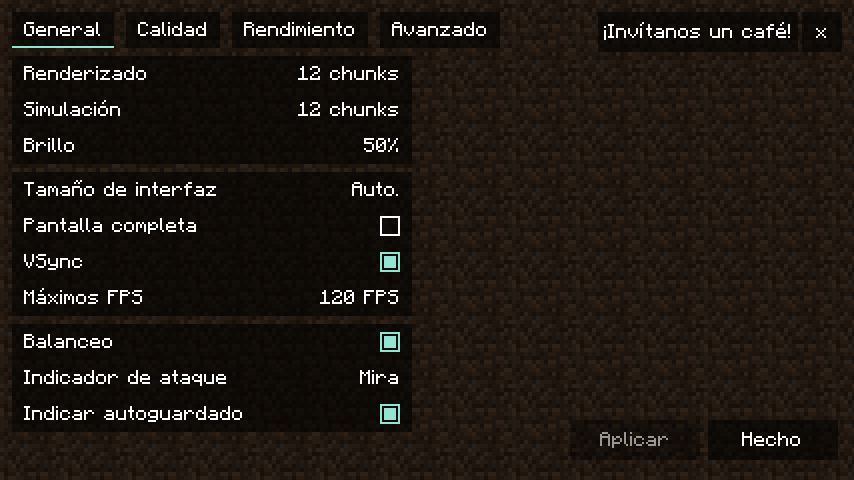
Sodium replaces Minecraft's video settings screen with its own, and those new options are often only in English. Translations for Sodium fills the gap. It is a plain resource pack carrying volunteer translations of every Sodium menu, tooltip and option, so the settings screen speaks the same language as the rest of your game.
Because it is a resource pack and not a mod, nothing changes in how Sodium works. It only swaps the text.
Features
- Covers dozens of languages, from German, French and Spanish to Japanese, Korean, Arabic and Vietnamese.
- Built on Crowdin, where anyone can translate, suggest better wording or vote on existing strings.
- New releases are published on Saturdays whenever translations have changed.
- Released as CC0, so modpack makers can include it freely.
Requirements
You need Sodium installed; the pack does nothing without it. Add it under Options → Resource Packs and make sure it is active. It is a client-side pack with no server component, and versions exist for a long run of Minecraft releases.
Who it helps
Any player who does not want to guess what "Chunk Memory Allocator" means in English, and modpack creators targeting non-English audiences. It pairs naturally with Sodium Extra and Reese's Sodium Options, which add more settings to the same menu.
FAQ
Why are Sodium's settings in English when my game is in another language?
Sodium itself ships with limited translations. This resource pack adds community translations for its menus, so enable it and the Sodium video settings follow your game language.
Is Vietnamese included?
Yes, Vietnamese is among the languages listed by the project, along with most major European and Asian languages.
Can I put this pack in my modpack?
Yes. The translations are released under CC0, so anyone can bundle them in a modpack without asking.
Gallery


Downloads by version
| Minecraft | Mod version | File | |
|---|---|---|---|
| 26.3 | v9.0.0 | 0.3 MB | Download |
| 26.2 | v9.0.0 | 0.3 MB | Download |
| 26.1.2 | v9.0.0 | 0.3 MB | Download |
| 26.1.1 | v9.0.0 | 0.3 MB | Download |
| 26.1 | v9.0.0 | 0.3 MB | Download |
| 1.21.11 | v9.0.0 | 0.3 MB | Download |
| 1.21.10 | v9.0.0 | 0.3 MB | Download |
| 1.21.9 | v9.0.0 | 0.3 MB | Download |
| 1.21.8 | v9.0.0 | 0.3 MB | Download |
| 1.21.7 | v9.0.0 | 0.3 MB | Download |
| 1.21.6 | v9.0.0 | 0.3 MB | Download |
| 1.21.5 | v9.0.0 | 0.3 MB | Download |
| 1.21.4 | v9.0.0 | 0.3 MB | Download |
| 1.21.3 | v9.0.0 | 0.3 MB | Download |
| 1.21.2 | v9.0.0 | 0.3 MB | Download |
| 1.21.1 | v9.0.0 | 0.3 MB | Download |
| 1.21 | v9.0.0 | 0.3 MB | Download |
| 1.20.6 | v9.0.0 | 0.3 MB | Download |
| 1.20.5 | v9.0.0 | 0.3 MB | Download |
| 1.20.4 | v9.0.0 | 0.3 MB | Download |
| 1.20.3 | v9.0.0 | 0.3 MB | Download |
| 1.20.2 | v9.0.0 | 0.3 MB | Download |
| 1.20.1 | v9.0.0 | 0.3 MB | Download |
| 1.20 | v9.0.0 | 0.3 MB | Download |
| 1.19.4 | v1.11.0 | 0.1 MB | Download |
| 1.19.3 | v1.11.0 | 0.1 MB | Download |
| 1.19.2 | v1.11.0 | 0.1 MB | Download |
| 1.19.1 | v1.11.0 | 0.1 MB | Download |
| 1.19 | v1.11.0 | 0.1 MB | Download |
| 1.18.2 | v1.11.0 | 0.1 MB | Download |
| 1.18.1 | v1.11.0 | 0.1 MB | Download |
| 1.18 | v1.11.0 | 0.1 MB | Download |
| 1.17.1 | v1.11.0 | 0.1 MB | Download |
🛡 Files are downloaded directly from Modrinth’s servers – we never modify or rehost them. Modrinth ↗
How to install this mod
- Click “Download” to get the .zip – do not unzip it.
- Copy it into
.minecraft/resourcepacks. - In game: Options → Resource Packs → click the arrow to enable it.
- Using several packs? Put the most important one on top.
💬 Comments
🔗 Works well with

✨ You might also like
New Glowing Ores
by GridExpert
Makes ores glow to make them more visible, and also adds connected outlines to them so you don't miss a single block. Mod support available

(Bee's) Fancy Crops
by bebebea_loste
My take on prettier farming, compatible with mods
Default Dark Mode
by nebulr
🌙 The Dark Mode Resource Pack for Minecraft: Java Edition

Explorer's Compass structure Translation
by CLOT-LIU
探险者(探险家)指南针结构汉化材质包,可以让你的旅途更加愉快₍˄·͈༝·͈˄*₎◞ ̑̑

Unique Dark
by amongstreality
Dark GUI with unique textures for functional blocks. Dark mode for 80 mods

Vanilla Experience+
by Kryqu
It improves, refines, and fixes various aspects while keeping the Vanilla style.