

Mellow
Shader · by TheCMK · 8.3M downloads · Minecraft 26.3
A shader for actually playing
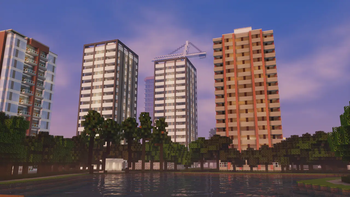
Most shader packs chase screenshots. Mellow is built for long survival sessions: soft, painterly colours, gentle lighting and nothing that strains your eyes after a few hours. It is also deliberately light on hardware, so it suits laptops and older PCs that struggle with heavier packs.
What you can tweak
- Colour presets to switch the overall palette in one click, plus simple controls for individual colours.
- Colour grading – saturation, exposure and a colour balance tool.
- Fog system with plenty of options, from barely-there haze to thick atmosphere.
- Several cloud styles.
- Shadows your way – cheap lightmap-based shading or proper shadow maps.
Compatibility
- Loaders – Iris (latest version recommended) or OptiFine, which mostly works with minor bugs.
- Minecraft – listed for 1.8 through 26.3, but only 1.17 and newer are actively tested.
- GPUs – modern NVIDIA, AMD and Intel on Windows and Linux. Macs are not guaranteed.
- Works alongside Distant Horizons, Voxy and Colorwheel.
- MIT licence, client only.
Who is it for?
If Complementary Reimagined is too heavy for your machine but plain vanilla feels flat, Mellow is a good middle ground. Other lightweight stylised options worth comparing are Pastel Shaders and Miniature Shader.
FAQ
Is Mellow good for low-end PCs?
Yes, that is one of its goals. It is tagged as a potato-friendly pack and lets you choose lightmap-based shadows, which are cheaper than full shadow maps.
Does Mellow work with Distant Horizons?
Yes. The author lists Distant Horizons, Voxy and Colorwheel among the mods it is compatible with.
Does Mellow work with OptiFine?
Mostly. The author recommends the latest Iris and mentions a few small bugs under OptiFine.
Gallery


Downloads by version
🛡 Files are downloaded directly from Modrinth’s servers – we never modify or rehost them. Modrinth ↗
How to install this mod
- Install Iris (with Sodium) or OptiFine – Iris runs on Fabric/NeoForge.
- Click “Download” to get the .zip – do not unzip it.
- Copy it into
.minecraft/shaderpacks. - In game: Options → Video Settings → Shader Packs → select the shader.
💬 Comments
✨ You might also like

Complementary Shaders - Reimagined
by EminGT
Preserving the elements of Minecraft with exceptional quality, detail, and performance.

Complementary Shaders - Unbound
by EminGT
Transforming the visuals of Minecraft with exceptional quality, detail, and performance.

MakeUp - Ultra Fast
by KDXavier
MakeUp aims to provide the best quality / performance ratio, building a shader that can be adapted to anyone's resources.

Hysteria Shaders
by ElocinDev
Atmospheric, highly customizable horror shaderpack, successor of Insanity Shader.

Noble Shaders
by BelmuTM
Using clever lighting techniques and powerful customization to create clean, immersive, and enjoyable visuals.

Bloop Shaders
by espen96
A shader aimed at maximum speed while maintaining good visuals. Scalable from low to high end computers.