

Cloth Config API
Mod · by shedaniel · 188.5M downloads · Minecraft 26.3
What is Cloth Config API?
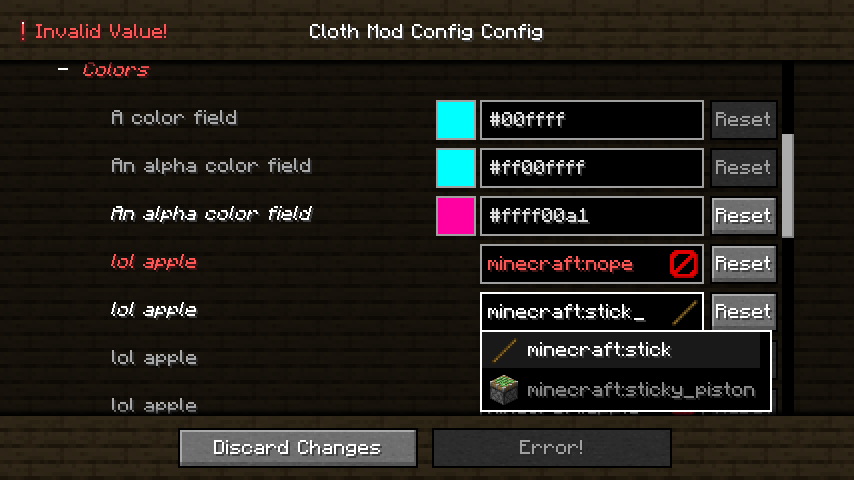
Cloth Config API is a library, not a gameplay mod. Mod authors use it to build configuration screens – the pages with toggles, sliders, colour pickers and text boxes where you change a mod's behaviour without editing files by hand. Installed alone it adds nothing you can see; it becomes useful the moment another mod relies on it.
If a mod page lists "Cloth Config" under its dependencies, grab the build that matches your Minecraft version and loader and put it in the mods folder next to that mod.
Why so many mods use it
- Consistent menus – options screens from different mods look and behave the same way, which makes them quicker to learn.
- Saves authors work – developers describe their settings and the library turns them into a full screen with tooltips, categories and reset buttons.
- Changes apply in-game – you adjust options while playing instead of hunting through config files.
Requirements and compatibility
| Loaders | Fabric, NeoForge, Forge |
| Minecraft | 1.14 up to 26.3 |
| Client / server | Optional on both – install it wherever a mod needs it |
| License | LGPL-3.0 |
On Fabric, pair it with Mod Menu so you get a button that opens each mod's settings. Without Mod Menu, many Fabric mods using Cloth Config have no way to reach their screen from the game.
Related libraries
Cloth Config is one of several config libraries. Some mods use YACL, owo-lib or Fzzy Config instead, and you may end up with more than one installed – that is normal and they do not conflict. Always check a mod's dependency list to see which one it wants – they are not interchangeable.
FAQ
Why does a mod say it needs Cloth Config?
That mod uses Cloth Config to draw its options screen. Without the library it either crashes at launch or has no settings menu, depending on how the author set it up.
How do I open Cloth Config settings?
Cloth Config has no menu of its own. You open the options of the mod that uses it, usually through Mod Menu on Fabric or the Mods button on Forge and NeoForge.
Do I need Cloth Config on my server?
Only if a server-side mod on that server lists it as a dependency. For client mods such as minimaps or HUD tweaks, installing it on your own game is enough.
Gallery
Downloads by version
| Minecraft | Loader | Mod version | File | |
|---|---|---|---|---|
| 26.3 | Fabric | 26.3.159+fabric | 1.1 MB | Download |
| 26.3 | NeoForge | 26.3.159+neoforge | 1.1 MB | Download |
| 26.2 | Fabric | 26.2.155+fabric | 1.1 MB | Download |
| 26.2 | NeoForge | 26.2.155+neoforge | 1.1 MB | Download |
| 26.1.2 | Fabric | 26.1.154+fabric | 1.1 MB | Download |
| 26.1.2 | NeoForge | 26.1.154+neoforge | 1.1 MB | Download |
| 26.1.1 | Fabric | 26.1.154+fabric | 1.1 MB | Download |
| 26.1.1 | NeoForge | 26.1.154+neoforge | 1.1 MB | Download |
| 26.1 | Fabric | 26.1.154+fabric | 1.1 MB | Download |
| 26.1 | NeoForge | 26.1.154+neoforge | 1.1 MB | Download |
| 1.21.11 | Fabric | 21.11.153+fabric | 1.1 MB | Download |
| 1.21.11 | NeoForge | 21.11.153+neoforge | 1.1 MB | Download |
| 1.21.10 | Fabric | 20.0.149+fabric | 1.1 MB | Download |
| 1.21.10 | NeoForge | 20.0.149+neoforge | 1.1 MB | Download |
| 1.21.9 | Fabric | 20.0.149+fabric | 1.1 MB | Download |
| 1.21.9 | NeoForge | 20.0.149+neoforge | 1.1 MB | Download |
| 1.21.8 | Fabric | 19.0.147+fabric | 1.1 MB | Download |
| 1.21.8 | NeoForge | 19.0.147+neoforge | 1.1 MB | Download |
| 1.21.7 | Fabric | 19.0.147+fabric | 1.1 MB | Download |
| 1.21.7 | NeoForge | 19.0.147+neoforge | 1.1 MB | Download |
| 1.21.6 | Fabric | 19.0.147+fabric | 1.1 MB | Download |
| 1.21.6 | NeoForge | 19.0.147+neoforge | 1.1 MB | Download |
| 1.21.5 | Fabric | 18.0.145+fabric | 1.1 MB | Download |
| 1.21.5 | NeoForge | 18.0.145+neoforge | 1.1 MB | Download |
| 1.21.4 | Fabric | 17.0.144+fabric | 1.1 MB | Download |
| 1.21.4 | NeoForge | 17.0.144+neoforge | 1.1 MB | Download |
| 1.21.3 | Fabric | 16.0.143+fabric | 1.1 MB | Download |
| 1.21.3 | Forge | 17.0.144+forge | 1.1 MB | Download |
| 1.21.3 | NeoForge | 16.0.143+neoforge | 1.1 MB | Download |
| 1.21.2 | Fabric | 16.0.143+fabric | 1.1 MB | Download |
| 1.21.2 | Forge | 17.0.144+forge | 1.1 MB | Download |
| 1.21.2 | NeoForge | 16.0.143+neoforge | 1.1 MB | Download |
| 1.21.1 | Fabric | 15.0.140+fabric | 1.1 MB | Download |
| 1.21.1 | Forge | 15.0.140+forge | 1.1 MB | Download |
| 1.21.1 | NeoForge | 15.0.140+neoforge | 1.1 MB | Download |
| 1.21 | Fabric | 15.0.140+fabric | 1.1 MB | Download |
| 1.21 | Forge | 15.0.140+forge | 1.1 MB | Download |
| 1.21 | NeoForge | 15.0.140+neoforge | 1.1 MB | Download |
| 1.20.6 | Fabric | 14.0.139+fabric | 1.1 MB | Download |
| 1.20.6 | Forge | 14.0.139+forge | 1.1 MB | Download |
🛡 Files are downloaded directly from Modrinth’s servers – we never modify or rehost them. Modrinth ↗
How to install this mod
- Install Fabric for the Minecraft version you play.
- Pick your Minecraft version + loader in the table above and click “Download” to get the .jar.
- Open
.minecraft/mods(Windows: type%appdata%\.minecraftin the address bar) and copy the file there. - Start the launcher, choose the Fabric profile and press Play.
💬 Comments
✨ You might also like

Fabric API
by modmuss50
Lightweight and modular API providing common hooks and intercompatibility measures utilized by mods using the Fabric toolchain.

YetAnotherConfigLib (YACL)
by isxander
A builder-based configuration library for Minecraft!

Fabric Language Kotlin
by modmuss50
This is a mod that enables usage of the Kotlin programming language for Fabric mods.

Architectury API
by shedaniel
An intermediary api aimed to ease developing multiplatform mods.

Just Enough Items (JEI)
by mezz
View Items and Recipes

Geckolib
by Gecko
A 3D animation library for entities, blocks, items, armor, and more!