

YetAnotherConfigLib (YACL)
Mod · by isxander · 137.2M downloads · Minecraft 26.3
What is YACL?
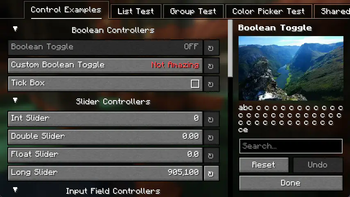
YetAnotherConfigLib, usually shortened to YACL, is a library mod. It adds nothing you can see on its own – instead, other mods use it to build their options screens. If you have ever opened the settings of a mod like Zoomify and seen tidy tabs, sliders and a colour picker, there is a good chance YACL drew that screen.
So the practical answer for most players is simple: you install YACL because another mod lists it as a requirement.
What it brings to the mods that use it
Its author created it because the older config libraries were either no longer receiving new features or were not built mainly for configuration. From a player's point of view, that results in menus that feel familiar:
- Vanilla-styled screens that blend in with Minecraft's own menus.
- Several control types – sliders or number fields, dropdowns, ON/OFF toggles, a full colour picker.
- Rich descriptions with hover text and image or animated previews of what an option changes.
- Tabs and collapsible groups so long option lists stay readable.
- Full keyboard navigation, which also makes it friendly to controller mods.
For developers it offers a builder-style API (inspired by Sodium's internal config system), built-in saving and loading, and an optional Kotlin DSL. Documentation is on the project's wiki.
Requirements and compatibility
- Loaders: Fabric, Quilt, Forge and NeoForge.
- Minecraft versions: 1.19 up to the latest releases. Builds are version-specific, so match the exact game version.
- Required on Fabric: Fabric API.
- Side: optional on both client and server – install it wherever the mod that needs it runs.
YACL coexists happily with other config libraries. It is common to have YACL, Cloth Config and owo-lib in the same instance because different mods pick different libraries.
Tips
To open those config screens comfortably on Fabric, add Mod Menu, which lists every installed mod with a settings button.
FAQ
Why does a mod ask me to install YACL?
That mod builds its settings menu with YACL. Without the library the mod cannot load, so download the YACL build that matches your Minecraft version and loader.
Does YACL need Fabric API?
On Fabric, yes. Fabric API is listed as a required dependency, so put both in your mods folder.
Does YACL have to be on the server?
Only if a server-side mod depends on it. For client mods such as Zoomify, installing it on your own game is enough.
Gallery
Downloads by version
| Minecraft | Loader | Mod version | File | |
|---|---|---|---|---|
| 26.3 | Fabric | 3.9.7+26.3-fabric | 1.1 MB | Download |
| 26.3 | NeoForge | 3.9.7+26.3-neoforge | 1.1 MB | Download |
| 26.2 | Fabric | 3.9.7+26.2-fabric | 1.1 MB | Download |
| 26.2 | NeoForge | 3.9.7+26.2-neoforge | 1.1 MB | Download |
| 26.1.2 | Fabric | 3.9.7+26.1-fabric | 1.1 MB | Download |
| 26.1.2 | NeoForge | 3.9.7+26.1-neoforge | 1.1 MB | Download |
| 26.1.1 | Fabric | 3.9.7+26.1-fabric | 1.1 MB | Download |
| 26.1.1 | NeoForge | 3.9.7+26.1-neoforge | 1.1 MB | Download |
| 26.1 | Fabric | 3.9.7+26.1-fabric | 1.1 MB | Download |
| 26.1 | NeoForge | 3.9.7+26.1-neoforge | 1.1 MB | Download |
| 1.21.11 | Fabric | 3.8.2+1.21.11-fabric | 1.1 MB | Download |
| 1.21.11 | NeoForge | 3.8.2+1.21.11-neoforge | 1.1 MB | Download |
| 1.21.10 | Fabric | 3.8.2+1.21.10-fabric | 1.1 MB | Download |
| 1.21.10 | NeoForge | 3.8.2+1.21.10-neoforge | 1.1 MB | Download |
| 1.21.9 | Fabric | 3.8.2+1.21.10-fabric | 1.1 MB | Download |
| 1.21.9 | NeoForge | 3.8.2+1.21.10-neoforge | 1.1 MB | Download |
| 1.21.8 | Fabric | 3.8.2+1.21.6-fabric | 1.1 MB | Download |
| 1.21.8 | NeoForge | 3.8.2+1.21.6-neoforge | 1.1 MB | Download |
| 1.21.7 | Fabric | 3.8.2+1.21.6-fabric | 1.1 MB | Download |
| 1.21.7 | NeoForge | 3.8.2+1.21.6-neoforge | 1.1 MB | Download |
| 1.21.6 | Fabric | 3.8.2+1.21.6-fabric | 1.1 MB | Download |
| 1.21.6 | NeoForge | 3.8.2+1.21.6-neoforge | 1.1 MB | Download |
| 1.21.5 | Fabric | 3.8.2+1.21.5-fabric | 1.1 MB | Download |
| 1.21.5 | NeoForge | 3.8.2+1.21.5-neoforge | 1.1 MB | Download |
| 1.21.4 | Fabric | 3.8.2+1.21.4-fabric | 1.1 MB | Download |
| 1.21.4 | NeoForge | 3.8.2+1.21.4-neoforge | 1.1 MB | Download |
| 1.21.3 | Fabric | 3.8.2+1.21.3-fabric | 1.1 MB | Download |
| 1.21.3 | NeoForge | 3.8.2+1.21.3-neoforge | 1.1 MB | Download |
| 1.21.2 | Fabric | 3.8.2+1.21.3-fabric | 1.1 MB | Download |
| 1.21.2 | NeoForge | 3.8.2+1.21.3-neoforge | 1.1 MB | Download |
| 1.21.1 | Fabric | 3.8.2+1.21.1-fabric | 1.1 MB | Download |
| 1.21.1 | NeoForge | 3.8.2+1.21.1-neoforge | 1.1 MB | Download |
| 1.21 | Fabric | 3.8.2+1.21.1-fabric | 1.1 MB | Download |
| 1.21 | NeoForge | 3.8.2+1.21.1-neoforge | 1.1 MB | Download |
| 1.20.6 | Fabric | 3.6.6+1.20.6-fabric | 1.1 MB | Download |
| 1.20.6 | NeoForge | 3.6.6+1.20.6-neoforge | 1.1 MB | Download |
| 1.20.5 | Fabric | 3.6.6+1.20.6-fabric | 1.1 MB | Download |
| 1.20.5 | NeoForge | 3.6.6+1.20.6-neoforge | 1.1 MB | Download |
| 1.20.4 | Fabric | 3.6.6+1.20.4-fabric | 1.1 MB | Download |
| 1.20.4 | NeoForge | 3.6.6+1.20.4-neoforge | 1.0 MB | Download |
🛡 Files are downloaded directly from Modrinth’s servers – we never modify or rehost them. Modrinth ↗
How to install this mod
- Install Fabric for the Minecraft version you play.
- Pick your Minecraft version + loader in the table above and click “Download” to get the .jar.
- Open
.minecraft/mods(Windows: type%appdata%\.minecraftin the address bar) and copy the file there. - Start the launcher, choose the Fabric profile and press Play.
💬 Comments
🔗 Works well with

✨ You might also like

Fzzy Config
by fzzyhmstrs
Config API with automatic GUIs, powerful validation options, server-client sync, and more!

Forge Config Screens
by Fuzs
Allows Forge's configs to be configured directly in-game. Quick and easy with a beautiful design!

WorldEdit
by me4502
A Minecraft Map Editor... that runs in-game! With selections, schematics, copy and paste, brushes, and scripting. Use it in creative, or use it temporarily in survival.
EMI Loot
by fzzyhmstrs
A loot drop (chest, block, entity) plugin for the EMI Recipe and Item viewer.

EMI Enchanting
by fzzyhmstrs
EMI Plugin that gives basic enchantment information; valid items, exlcusions, etc.

Just Enough Items (JEI)
by mezz
View Items and Recipes