

Terralith
Datapack · by Starmute · 25.1M downloads · Minecraft 26.3
What does Terralith add?
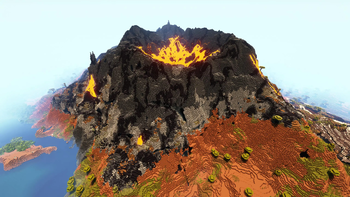
Terralith takes the bigger mountains and caves that arrived in Minecraft 1.18 and pushes them much further. It adds over 95 new biomes, refreshes most vanilla ones and introduces new landforms – canyons, shattered terrain, floating islands, deep ocean trenches and more. Everything is built from vanilla blocks, so it fits any texture pack and needs no client-side mod.
The biomes mix two moods:
- Realistic – landscapes inspired by real places, such as a Yellowstone-style biome, Yosemite cliffs, volcanic peaks and desert oases. Flat Highlands variants are a builder's dream.
- Light fantasy – glowing purple groves, amethyst rainforests, red mountains, mirage islands and a nostalgic nod to old Alpha-era terrain.
Underground there are custom caves too, from jungle-like caverns to fungus-filled and spider-infested ones, plus a dangerous deep variant. A few structures – icy spires, fortified villages, small huts – tie the world together.
Mod or datapack?
Terralith ships as both. Since version 2.6.0 the mod version requires the Lithostitched library and adds extras the datapack lacks: a config file (toggle custom structures, fog tweaks, sky islands, terrain slabs, vanilla stone blobs, recipe changes) and support for every world type, including Amplified and two fun new presets. Do not swap between mod and datapack in the same world.
Compatibility notes
- Biome mods that use TerraBlender generally work; other biome datapacks usually don't.
- With Tectonic use the mod versions, or the Terratonic datapack.
- Structure packs like Structory and Towns and Towers combine nicely.
- Server-side by nature: install it on the server or in the world's
datapacksfolder before generating.
Official add-ons let you remove the intro message, disable Terralith's structures, restore vanilla andesite/diorite/granite blobs or add extra stone recipes. If using datapack add-ons, load them above Terralith.
FAQ
Can I add Terralith to an existing world?
It is not recommended. Old chunks will not match new terrain, so start a new world. Also note that you cannot remove Terralith from a world once it uses it.
Does Terralith work with Tectonic?
Yes with the mod versions. If you use datapacks, install Terratonic instead of Tectonic, because the regular Tectonic datapack is not built to combine with Terralith.
Do players need Terralith installed to join my server?
No. Since it only uses vanilla blocks, the server handles everything and clients can join without it.
Gallery


Downloads by version
| Minecraft | Mod version | File | |
|---|---|---|---|
| 26.3 | 2.6.5+26.3 | 2.8 MB | Download |
| 26.2 | 2.6.4 | 2.9 MB | Download |
| 26.1.2 | 2.6.2 | 2.8 MB | Download |
| 26.1.1 | 2.6.2 | 2.8 MB | Download |
| 26.1 | 2.6.2 | 2.8 MB | Download |
| 1.21.11 | 2.6.0 | 2.8 MB | Download |
| 1.21.10 | 2.5.13 | 2.8 MB | Download |
| 1.21.9 | 2.5.13 | 2.8 MB | Download |
| 1.21.8 | 2.5.13 | 2.8 MB | Download |
| 1.21.7 | 2.5.13 | 2.8 MB | Download |
| 1.21.6 | 2.5.13 | 2.8 MB | Download |
| 1.21.5 | 2.5.13 | 2.8 MB | Download |
| 1.21.4 | 2.5.8 | 3.0 MB | Download |
| 1.21.3 | 2.5.8 | 3.0 MB | Download |
| 1.21.2 | 2.5.8 | 3.0 MB | Download |
| 1.21.1 | 2.5.8 | 3.0 MB | Download |
| 1.21 | 2.5.8 | 3.0 MB | Download |
| 1.20.6 | 2.5.4 | 3.0 MB | Download |
| 1.20.5 | 2.5.4 | 3.0 MB | Download |
| 1.20.4 | 2.5.4 | 3.0 MB | Download |
| 1.20.3 | 2.5.4 | 3.0 MB | Download |
| 1.20.2 | 2.5.4 | 3.0 MB | Download |
| 1.20.1 | 2.5.4 | 3.0 MB | Download |
| 1.20 | 2.5.4 | 3.0 MB | Download |
| 1.19.4 | 2.3.12 | 2.9 MB | Download |
| 1.19.3 | 2.3.12 | 2.9 MB | Download |
| 1.19.2 | 2.3.12 | 2.9 MB | Download |
| 1.19.1 | 2.3.12 | 2.9 MB | Download |
| 1.19 | 2.3.12 | 2.9 MB | Download |
🛡 Files are downloaded directly from Modrinth’s servers – we never modify or rehost them. Modrinth ↗
How to install this mod
- Click “Download” to get the .zip.
- Copy it into
.minecraft/saves/./datapacks - Or when creating a new world: Data Packs → drag and drop the file.
- In a running world type
/reload.
💬 Comments
🔗 Works well with
✨ You might also like

Dungeons and Taverns
by NovaWostra
A Structure Datapack adding dungeons, taverns and other structures to find while you explore the world.

Towns and Towers
by Biban_Auriu
Spice up your world with new villages, pillager outposts, and even new ships!

Tectonic
by Apollo
Terrain shaping brought to new heights, grander and more varied than ever before!

Trek
by hotsuop
Bored of vanilla structure generation? This pack is for you!

Geophilic
by bebebea_loste
A subtle-ish overhaul of vanilla Overworld biomes! Reworked!

Incendium Legacy
by Starmute
A nether biome overhaul combined with challenging structures to conquer, unique weapons to obtain, and tricky mobs to defeat.